
For each server you want to be monitored by a proxy, these requirements must be met:
- TCP port 445 open to proxy server for reading performance counters from the PerfMon API
- TCP port 1433 (or whichever is configured for SQL Server) open to proxy server
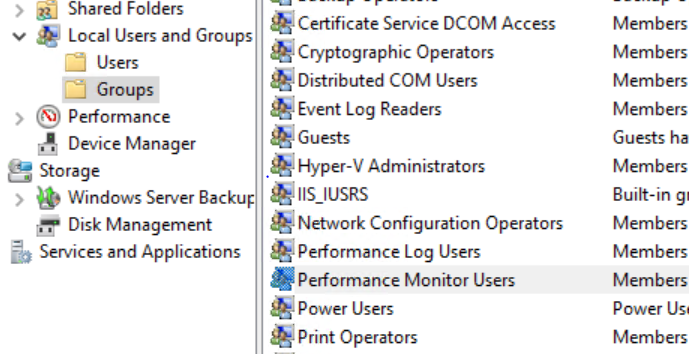
- The proxy user account should be a member of the Performance Monitor Users group
- The proxy user account needs access to each monitored instance and database
- The proxy user needs remote access to the registry (optional)
- The Remote Registry service must be running
- The Performance Logs & Alerts service must be running
The following SQL script should be run in SQLCMD mode for every SQL Server instance you want to monitor. To enable SQLCMD mode, open the Query menu in Management Studio and select SQLCMD mode.
--Set the full domain username here, without quotes. Format: DOMAIN\USERNAME
:setvar username <set user name here>

--Below this line you should not need to change anything
--Create the login
USE [master]

CREATE LOGIN [$(username)] FROM WINDOWS
GO

--Permissions for monitoring
GRANT VIEW ANY DATABASE TO [$(username)]
GO
GRANT VIEW SERVER STATE TO [$(username)]
GO
EXEC sp_MSforeachdb 'USE [?] CREATE USER [$(username)] FOR LOGIN [$(username)]'
GO

--Permissions for Profiling/Trace use
GRANT ALTER TRACE TO [$(username)]
GO

--Permissions for Diagnostics use
GRANT VIEW ANY DEFINITION TO [$(username)]
GO

USE [msdb]
GRANT SELECT ON OBJECT::sysjobs to [$(username)]
GO

GRANT SELECT ON OBJECT::sysjobhistory to [$(username)]
GO
EXEC sp_MSforeachdb 'USE [?] GRANT SELECT ON OBJECT::sys.system_internals_allocation_units to [$(username)]'
GO
To read performance counters, the proxy user needs to be in the Performance Monitor Users group for the servers it monitors. To add the user, right-click on the Windows icon, select Computer Management, and double-click on the Performance Monitor Users group.
The proxy depends on the below services running on the monitored server:
- Remote registry
- Performance logs & alerts
It is recommended to set their status to Automatic.
Optional: to read server properties from the monitored server’s registry, the proxy user should be granted access to the remote registry. To do this, open regedit and find the following key:
HKEY_LOCAL_MACHINE\SYSTEM\CurrentControlSet\Control\SecurePipeServers\winreg
Right-click on the key, choose Permissions from the dropdown menu, and add read permissions for the proxy user.